Struggling with high ping, lag spikes, and packet loss in your favorite online games? This wtfast review dives into a specialized solution designed to reduce gaming lag and significantly improve connection stability.
In this comprehensive review, we’ll explore wtfast’s AI-powered gaming network technology, its flexible pricing plans, broad compatibility, and genuine user experiences to help you decide if it’s the right online gaming optimizer for your setup.
WTFast is a specialized online gaming optimizer designed to reduce gaming lag by improving your connection to game servers. At its core is the patented GPN® (Gamers Private Network) technology, which ensures your game traffic is routed through the most efficient path possible. Unlike traditional VPNs, WTFast uses a private network specifically engineered for gamers, minimizing latency, packet loss, and jitter for a smoother gaming experience. Powered by AI, WTFast’s routing system continuously learns and adapts to network conditions in real time. It dynamically selects the optimal traffic paths, avoiding congested or slow routes. This AI-driven approach maximizes game server connection stability and lowers ping, which is critical for competitive gamers seeking reliable, low latency gaming. If you’re concerned about platform compatibility, WTFast supports a broad range of popular games across PC, Xbox, and mobile devices. Whether you play Fortnite, PUBG, Rocket League, or many other titles, it helps optimize your connection and maintain consistent performance. For gamers looking for the best software to reduce online gaming lag, WTFast is a strong choice that combines cutting-edge technology with broad game support. You can explore their pricing and subscription options directly on the official website.
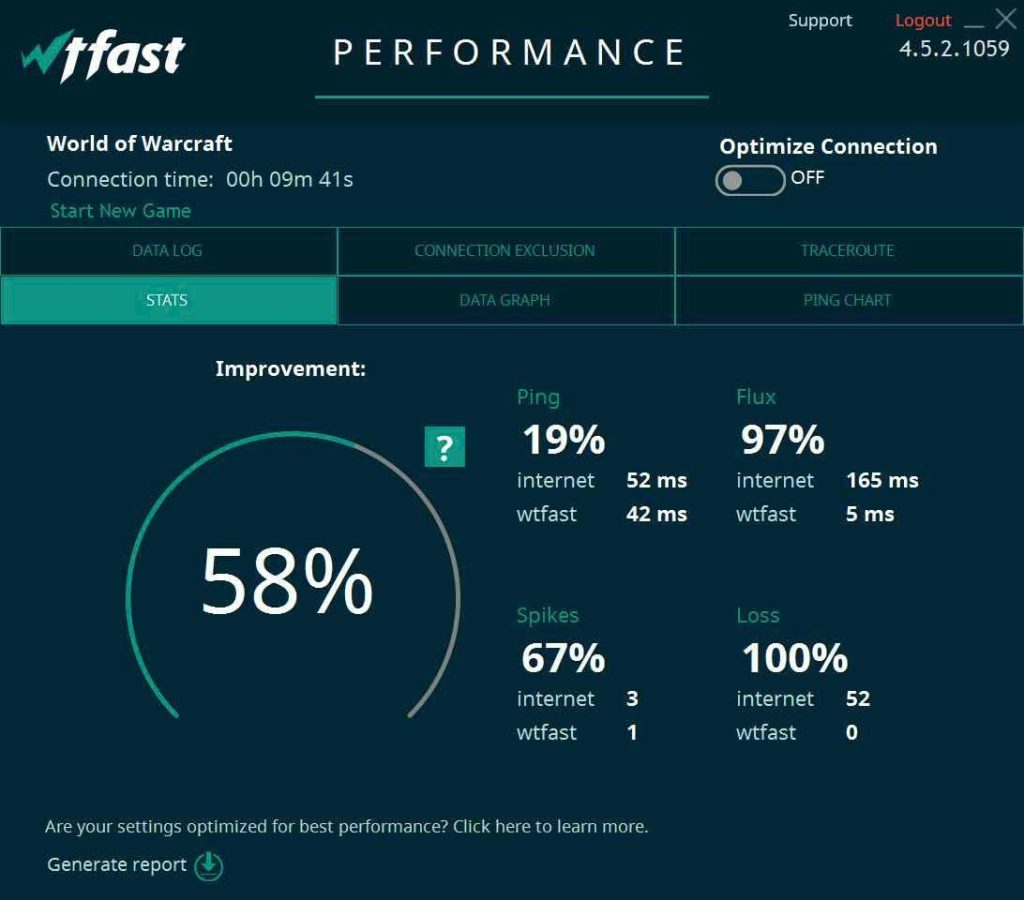
WTFast enhances your online gaming experience through several standout features designed to reduce lag and improve connection stability. One key feature is its real-time ping and packet loss analytics, which allow you to monitor your connection quality continuously. This transparency helps gamers identify connection issues immediately, ensuring a smoother gameplay experience without unexpected interruptions. Another powerful aspect of WTFast is its automatic route selection powered by machine learning. Instead of relying on traditional network paths, WTFast intelligently chooses the fastest and most reliable routing for your game traffic. This adaptive routing minimizes latency and packet loss, especially during peak times or congested network routes, which is crucial for competitive gaming. These features have a tangible impact on popular games like Fortnite, PUBG, and Rocket League. Players often report noticeable reductions in in-game lag and more stable connections, allowing for better reaction times and an overall improved competitive edge. For example, Fortnite gamers have experienced lower ping, translating to smoother aiming and building, while PUBG players enjoy fewer connection drops during critical moments. If you’re curious about how WTFast can specifically boost your gaming performance, it’s worth giving the free trial a shot to experience the benefits firsthand. You can explore their offerings on the official website and see if the AI-powered optimization fits your gaming needs.
WTFast offers several subscription plans tailored to different gaming needs, all designed to reduce gaming lag through their patented AI-powered Gamers Private Network (GPN®). Users can choose from monthly, quarterly, or annual plans, with the longer commitments offering better overall value. This flexibility allows gamers to pick a plan that fits both their gaming frequency and budget. Here’s a clear pricing comparison for quick reference: New users can benefit from WTFast’s free trial, which offers a risk-free way to test the service and experience lower ping and fewer lost packets firsthand. Additionally, their refund policy provides reassurance by allowing customers to request refunds within a certain timeframe if the service does not meet expectations. Unlike traditional VPNs that route all traffic and can slow connections, WTFast specializes in optimizing game server connections only. Its dedicated GPN® technology intelligently routes your gaming data along the fastest, most efficient paths using machine learning. This focused approach means you get significantly lower latency and smoother gameplay without the downsides common to VPNs. If you’re serious about competitive or casual gaming with minimal lag, checking out the official website to explore their subscription plans is a smart move. And before subscribing, it’s worth looking for any exclusive deals that can help you save on your purchase.
Using WTFast for competitive gaming offers several clear benefits that can significantly enhance your gameplay. The primary advantages include lower latency, reduced packet loss, and a much more stable connection. By utilizing its patented AI-powered GPN technology, WTFast optimizes the path between your device and game servers, which directly translates to smoother, more responsive gaming—key factors when milliseconds matter in competitive matches. For example, Fortnite and PUBG players frequently report noticeable ping reductions, helping them react faster and gain an edge. However, like any tool, WTFast has some limitations worth noting. Compatibility can sometimes be an issue, as it may not seamlessly support every gaming platform or server configuration, especially on some consoles like Xbox. Additionally, the quality of your base internet connection still plays a role; WTFast optimizes traffic but can’t fully compensate for extremely poor or unstable ISPs. Understanding these boundaries helps set realistic expectations before subscribing. Many users have shared positive experiences, emphasizing how WTFast has improved their online gaming. From reducing frustrating lag spikes to stabilizing connections during critical moments, player testimonials highlight performance gains that confirm the software’s value. One player mentioned cutting their ping from 220 ms to around 120 ms on distant servers, making a real competitive difference. If you’re serious about competitive gaming, it’s worth exploring how WTFast can optimize your connection. Before committing, you might want to check for any exclusive deals to save on your purchase. For more details on how WTFast works in competitive settings, you can also explore their collection on the official website.
Downloading and setting up WTFast is straightforward. Start by visiting the official website to download the software compatible with your system. After installation, launch WTFast and create your account or log in. The initial setup wizard will prompt you to select your preferred game from the supported list, allowing the software to optimize connection paths specifically for that title. This quick process gets you ready to reduce gaming lag efficiently. Next, configuring your game for optimal performance involves selecting the right server based on your location and game choice. WTFast’s AI-powered GPN® technology automatically picks the best routes, but you can manually adjust settings to further optimize ping and connection stability. For example, gamers playing Fortnite or PUBG can experience noticeable improvements by choosing servers closer to game servers or those with lower latency. This personalized setup ensures smoother gameplay and fewer interruptions caused by lag or packet loss. To maximize benefits, monitor your connection with WTFast’s real-time analytics. The software provides detailed insights into your ping, packet loss, and traffic routes, letting you gauge the effectiveness of the optimization. Regularly checking these stats helps in tweaking settings for the best results. Additionally, it’s wise to keep your WTFast subscription active to access premium routes and enjoy uninterrupted low latency gaming. Before purchasing, you might want to check for exclusive deals to save on your subscription. Get Started with WTFast
WTFast is best suited for competitive gamers and players experiencing lag or high ping during online matches. If you frequently find yourself battling delays or packet loss that hinder your performance, WTFast’s AI-powered GPN® (Gamers Private Network) can optimize your game traffic, delivering a smoother, more responsive connection. For instance, esports players and streamers often rely on WTFast to maintain low latency and stable gameplay, which can make all the difference in high-stakes matches. The service works well across a variety of internet connections—including DSL, cable, fiber, and even some mobile networks—adjusting the routing dynamically to avoid congestion and reduce lag. This broad compatibility ensures most users can benefit regardless of their network type or geographic location. However, if you have a very stable, low-latency connection already—for example, through premium fiber optic service with minimal routing issues—WTFast might not provide noticeable improvements. For more on tools that help mitigate game delays, you might want to explore other gaming lag compensation software. If you wonder about WTFast’s effectiveness, many users report significant ping reductions and improved stability. Unlike traditional VPNs, WTFast’s proprietary GPN® focuses solely on optimizing game traffic, avoiding typical VPN drawbacks like slower speeds and broader traffic routing. Furthermore, WTFast supports major gaming platforms including PC, Xbox, and mobile devices, ensuring widespread usability for different gaming preferences. Not ready to commit? WTFast offers a free trial period, allowing you to test its impact without upfront costs. Plus, they provide a straightforward refund policy if you find the service does not meet your expectations. For detailed info on pricing and subscription plans, it’s best to check the official website.
Before you make your final decision, it might be worth checking if there are any active deals or discount codes available — a little extra savings never hurts.What is WTFast and How Does It Reduce Gaming Lag?
Key Features of WTFast That Improve Your Online Gaming Experience
WTFast Pricing and Subscription Plans Breakdown
Subscription Plan
Cost
Billing Cycle
Monthly
$9.99
1 month
Quarterly
$27.99
3 months
Annual
$89.99
12 months

Pros and Cons of Using WTFast for Competitive Gaming
Pros
Cons
Significantly lowers latency and ping
Limited compatibility with some platforms
Reduces packet loss and connection jitters
Requires a reasonably stable internet connection
Enhanced game server stability
Subscription-based pricing might deter casual gamers
How to Download, Install, and Use WTFast: A Step-by-Step Guide
Who Should Consider Using WTFast for Their Online Gaming Needs?