
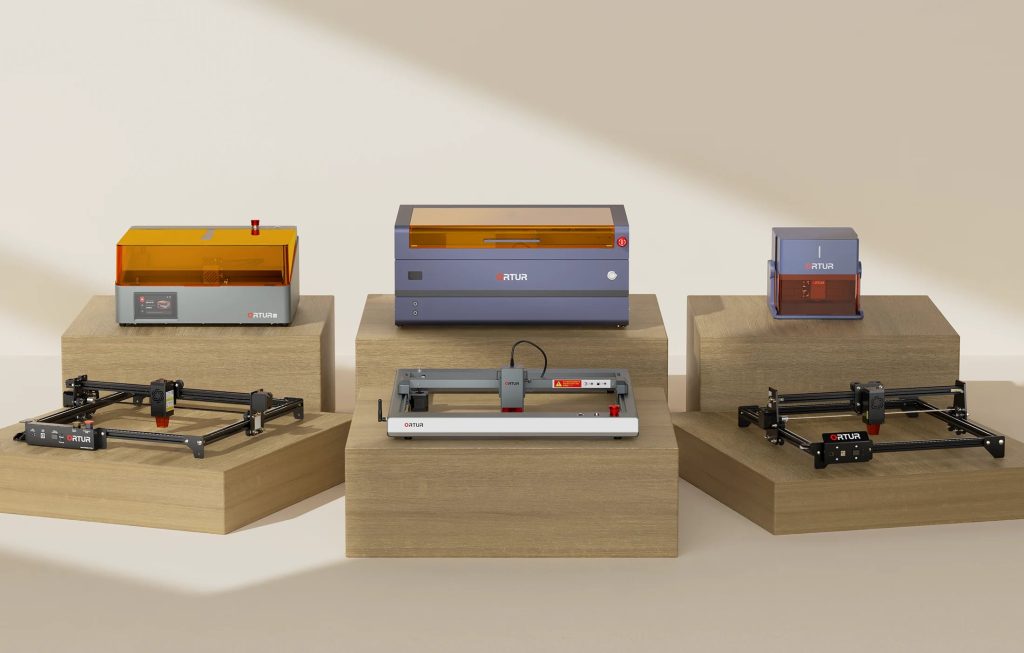
Discovering the perfect laser engraver can feel overwhelming with so many models on the market. If you want a reliable, high-performance option, this Ortur review will help you understand if Ortur’s laser engraving and cutting machines are the right fit for your creative projects or professional needs.
This review dives deep into popular Ortur models like the LM3 and LM2 Pro S2, highlighting important features including laser modules, accessories, and material compatibility. You’ll also find practical tips on how to maximize the potential of your Ortur laser engraving machine for precise, efficient results.
Ortur has built a strong reputation as a leader in the laser engraving space, offering a diverse lineup of laser engraving and cutting machines designed to meet a range of needs. Their product range includes notable models like the Ortur LM3, the LM2 Pro S2, and the newer LM3 LE, each tailored for different levels of users from beginners to advanced hobbyists and professionals. The company’s commitment to innovation is clear through its extensive patents and its development of a complete ecosystem. This includes not only their high-speed, precise laser engravers capable of handling materials from wood to metal, but also a suite of accessories like rotary chucks and enclosures, plus the dedicated Ortur app for seamless machine control and creative community sharing. That integration makes Ortur engravers highly adaptable, empowering users to explore a broad array of creative projects with confidence and convenience. If you’re new to laser engraving, you might find their product comparison and user guides especially helpful to identify the best Ortur laser engraver for beginners.
Ortur laser engravers stand out with their impressive high-speed engraving capabilities, reaching speeds up to 20,000mm/min. This allows for exceptional precision and efficiency, making it perfect for detailed projects that demand quick turnaround times without sacrificing quality. Whether working on complex cuts or fine engravings, users benefit from an unmatched engraving experience that keeps productivity high. Safety is a paramount focus in Ortur machines, equipped with multiple protections such as voltage and current control systems, along with active position protection. These features help prevent electrical issues and mechanical errors, ensuring a secure environment during operation. This level of safety reduces downtime and builds confidence, especially for beginners exploring laser engraving. Operating an Ortur engraver is intuitively managed through the company’s exclusive Ortur app, which offers seamless laser control, design management, and community sharing. Additionally, these machines are fully compatible with popular third-party software like Lightburn and LaserGRBL, enhancing versatility for users who prefer advanced customization. This intelligent control system makes Ortur engravers accessible to both novices and experienced users alike. For anyone interested in exploring these features further, the official website offers detailed information and the chance to explore their collection. Before you buy, it’s wise to look out for exclusive deals that might help you save on your purchase. Also, don’t forget to check out important laser engraving safety tips for a secure and enjoyable experience with your new Ortur laser engraving machine.
Ortur offers a variety of laser modules tailored to different engraving needs, including the 1.3W IR, 2W IR, and the high-powered 40W LU3-40A. Each module provides distinct power levels and precision: the 1.3W and 2W IR models are excellent for detailed, lighter engraving tasks, while the 40W LU3-40A handles heavier-duty cutting and faster engraving, making it ideal for professional projects. Popular accessories expand the capabilities of Ortur machines further. Notably, the Y-axis Rotary Chuck (YRC 1.0) allows for cylindrical object engraving, enabling users to personalize items like bottles or mugs with ease. Additionally, Ortur enclosures enhance safety and noise reduction, helping to create a more controlled and comfortable workspace. One of Ortur’s strengths is its compatibility with a wide range of materials. From wood, acrylic, and leather to metal and fabric, these laser engravers handle diverse projects with precision. This versatility allows creatives and professionals to explore endless possibilities in crafting customized gifts, signage, and décor. If you’re considering an Ortur laser engraving machine, it’s worth exploring bundle deals that often include free accessories, enhancing value and versatility right from the start. To ensure you’re working with the right materials and settings, you might want to consult the official website and check for any available exclusive deals to save on your purchase.
Ortur laser engravers come with a broad range of pricing options to fit various skill levels and project demands. For instance, the Ortur LM3 starts around $300 for its base models, while the advanced LM2 Pro S2 can be found near $180 for more budget-conscious users looking for solid performance. Laser modules such as the 40W LU3-40A typically range higher, reflecting their powerful cutting capabilities and versatility. This pricing flexibility makes Ortur machines accessible whether you’re a beginner exploring laser engraving or a professional needing precise, high-speed output. On the warranty front, Ortur offers a reliable one-year warranty covering manufacturing defects, complemented by professional technical support accessible through email, social media channels, and an active online community. Their customer service extends to guiding users during setup and troubleshooting, ensuring you’re never left in the dark. When it comes to returns, Ortur provides a straightforward 30-day return policy if the product is returned in its original packaging, giving buyers peace of mind. Shipping is free for the vast majority of regions, though some areas may incur partial charges. To get the best value, it is worth looking for exclusive deals available from time to time, which can significantly reduce your initial investment.
The Ortur laser engravers stand out for their remarkable precision and robust safety features, which users and experts alike have praised consistently. Equipped with sophisticated safety systems including active position protection and voltage control, these machines ensure a secure operation environment—essential for both hobbyists and professionals. Additionally, the seamless integration with software like the Ortur app and compatibility with popular platforms like Lightburn elevate the user experience, offering intuitive control and easy access to creative tools. Versatility is another key strength of the Ortur series, capable of handling diverse materials ranging from wood and fabric to metal and leather. This flexibility opens up a broad spectrum of creative applications, whether for custom gift-making, woodworking, or personalized crafts. For instance, artisans have shared that the high engraving speed of up to 20,000mm/min allows for efficient production without compromising detail, making it ideal for small business use. On the flip side, some users note a learning curve with mastering the software and setup. However, this initial complexity encourages deeper engagement and mastery of the machine’s full capabilities, ultimately benefiting long-term users. Accessory costs can also add up, but investing in genuine Ortur accessories ensures optimal performance and compatibility, enhancing overall results. For those interested, it is worth checking the latest discount codes to save on your purchase before you decide. Many users have shared glowing reviews about their experience, emphasizing how the precision and dependable safety features have transformed their crafting projects into professional-grade work. To explore the full range, you can always check it out on the official website.
Setting up your Ortur laser engraver is straightforward and beginner-friendly. Start by assembling the frame according to the included instructions, ensuring all screws and components are tightly secured. Once the physical setup is complete, connect the engraver to your computer or mobile device via USB or Wi-Fi, depending on your model. This connection enables seamless control through the Ortur app, which is designed to be intuitive for new users. Operating the Ortur laser engraving machine is simplified via the dedicated Ortur app. After uploading your design, adjust the engraving speed settings based on the material you’re working with—lighter woods require faster speeds, while denser materials like acrylic benefit from slower, more precise passes. Many users find starting around 1500 to 3000 mm/min effective, then fine-tuning from there depending on the outcome. This hands-on control ensures you get crisp, professional results without excessive trial and error. Maintaining your Ortur engraver enhances its longevity and performance. Regularly clean the laser lens and machine bed to prevent dust buildup, which can affect engraving quality. Lubricate the rails and check for loose screws to keep movements smooth and accurate. For detailed guidance, be sure to review our comprehensive how to clean Ortur laser engraver resource. Such upkeep safeguards your investment and maintains optimal engraving precision over time. If you’re interested in trying the Ortur laser engraving machine, it might be worth looking for the latest discount codes to save on your purchase. Explore their official website to check out the full range and see what fits your needs best.
The Ortur laser engraver is an excellent choice for a wide range of users, including hobbyists who enjoy crafting and DIY projects, small business owners looking to expand their product offerings, educators seeking hands-on STEM tools, and custom gift makers wanting to add a personal touch to their creations. Its versatility makes it suitable for anyone interested in precision engraving and cutting on various materials. Ortur machines are designed to accommodate different experience levels, from beginners who appreciate the user-friendly Ortur app to seasoned professionals needing high-speed performance and intricate detail. Whether you’re working in woodworking, leather crafting, or even light metal engraving, Ortur provides reliable results that can enhance your workflow. For those considering where to invest, the Ortur laser engraver stands out as a top choice due to its blend of speed, safety features, and upgrade potential—such as swapping laser modules to tailor the power and precision. If you’re just getting started, look out for starter kits and bundle deals that include essential accessories to get your projects off the ground smoothly. You might also want to check for any available discounts first to save on your purchase. For more details or to explore their full lineup, visit the official website and consider grabbing a bundle to kickstart your creative journey.
Before you make your final decision, it might be worth checking if there are any active deals or discount codes available — a little extra savings never hurts.Overview of Ortur Laser Engravers
Key Features and Specifications That Set Ortur Apart
Feature
Ortur LM3
Ortur LM2 Pro S2
Max Engraving Speed
20,000mm/min
15,000mm/min
Laser Power
40W / 20W options
10W / 5W options
Control Software
Ortur App, Lightburn, LaserGRBL
Ortur App, Lightburn, LaserGRBL
Safety Features
Voltage/current control, position protection
Voltage/current control, position protection
Ortur Laser Modules, Accessories & Materials Explained
Pricing, Warranty & Support Details

Pros and Cons Based on User Experience and Expert Analysis
How to Use the Ortur Laser Engraving Machine – A Beginner’s Guide
Who Should Consider Buying an Ortur Laser Engraver?

